Posts vanish on X (formerly Twitter) every day. Users delete videos, accounts go private without warning, and live broadcasts end without a trace. If you have ever lost a clip you meant to save, or tried to find a bookmark that leads to a “Tweet Deleted” page, you already know the frustration. The digital world is ephemeral, and reliance on cloud bookmarks is often a mistake.
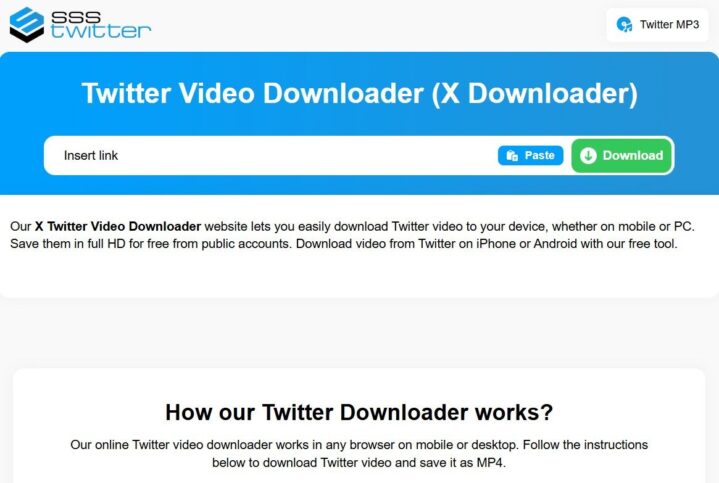
sssTwitter works as a comprehensive Twitter video downloader designed to solve this volatility. It pulls content directly from public posts, stripping away the platform’s restrictions. Paste a link, select a format, and the file is downloaded to your device as a standalone asset. No signup, no software install, no waiting.
The Challenge of Media on X
Since the rebranding from Twitter to X, the platform has pivoted heavily toward video and long-form audio content. However, the platform’s native tools for saving this content are limited or non-existent for non-paying users.
Even Premium users often face restrictions on downloading content from others. This creates a gap between content consumption and content preservation. sssTwitter bridges that gap, treating X as a vast library of media that you should be able to access offline.
What sssTwitter Downloads from X
The tool handles more than just standard video clips. Different media types require different extraction methods, and our engine handles them all automatically. Here is a detailed breakdown of supported content types and output formats:
- High-Definition Videos (MP4) X compresses videos for streaming, but the source files are often high quality. We extract the highest available resolution, up to Full HD (1080p).
- Output: MP4
- Quality: Up to Full HD (1080p)
- Audio from Video Posts & Spaces (MP3) Sometimes you don’t need the visual; you just need the sound. This is perfect for music clips, speeches, or podcasts hosted on X.
- Output: MP3
- Quality: Original bitrate
- Images and Photos X often serves scaled-down versions of images to mobile devices to save data. Our downloader fetches the original source URL, ensuring you get the sharpest PNG or JPG available.
- Output: PNG / JPG
- Quality: Original resolution
- Animated GIFs Technically, X converts uploaded GIFs into silent video loops (MP4) to save bandwidth. Saving these via a right-click often results in a video file, not a GIF. Our tool allows you to choose: keep it as a video or convert it back to a loopable GIF format.
- Output: GIF / MP4
- Quality: Original quality
- Live Broadcasts Broadcast downloading is a powerful addition. X users who host live sessions often leave the recording up for a short time. However, once the broadcaster deletes it, hours of content can be lost. You can now preserve those recordings permanently.
- Output: MP4
- Quality: Available stream quality
Why Not Just Screen Record?
Many users ask why they should use a downloader instead of simply screen-recording the content on their phone. While screen recording is a quick fix, it degrades quality significantly.
- Audio Quality: Screen recording captures audio through your device’s internal mixer, often resulting in lower volume or notification sounds interfering with the clip.
- Visual Clutter: Recordings capture the interface—likes, retweets, time bars, and battery icons. A downloader gives you the clean, raw file.
- Metadata: Screen recordings are just raw pixels. Downloading the file preserves the integrity of the media container.
How the Twitter Downloader Works
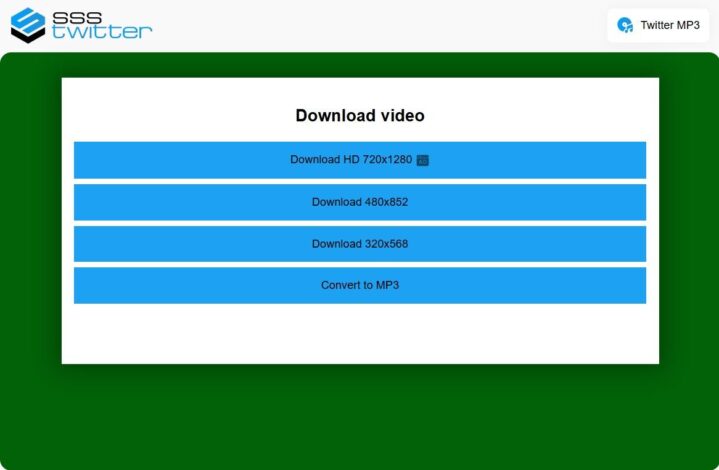
We have engineered the process to be as frictionless as possible. Three steps cover the entire operation:
- Copy the post URL from X: Whether you are on the app or desktop, tap the “Share” icon (the arrow) and select “Copy link.”
- Paste it into sssTwitter: Navigate to our site and paste the link into the main input field.
- Select format and Download: The system will analyze the link and offer you available resolutions. Tap your choice.
The server fetches the file, processes it, and delivers a direct download link. Most clips finish in under ten seconds. No account creation is required. No app to install. The browser handles everything, which means the tool runs identically on phones, tablets, and desktops.
Device and Browser Compatibility

sssTwitter operates inside any modern web browser. Chrome, Safari, Firefox, Edge, and mobile browsers on iOS or Android all work without issues.
For Android Users: The experience is native. When you hit download, the file automatically saves to your “Downloads” folder, accessible via your Gallery or File Manager.
For iPhone/iPad (iOS) Users: Due to Apple’s security protocols, the process has a slight nuance.
- iOS 13+: You can download directly in Safari. A download icon will appear in the address bar. Once finished, the video resides in the “Files” app. From there, you can “Save Video” to move it to your main Photos roll.
- Older iOS versions: You may need to use a file management app like “Documents by Readdle” to handle the download, as older Safari versions do not support direct file saving.
For Desktop Users: This is the most straightforward method. Videos save to your default download location (usually the “Downloads” folder on Windows and Mac). You can easily drag and drop these files into video editing software or archive folders.
Because processing happens on remote servers, your device specs do not matter. A five-year-old phone downloads just as fast as a new high-end laptop.
Why Save X Content at All?
The use cases for archiving content are vast and vary from professional to sentimental.
- Journalism and Archiving: In an era of “fake news” and rapid deletions, journalists need to grab footage of breaking news before sources delete posts or accounts get suspended.
- Academic Research: Researchers archive data for social studies that require permanent records of public sentiment or specific events.
- Content Creation: You might need a clip for a reaction video, a montage, or a documentary. Having the clean source file is essential for editing.
- Education: Educators store tutorial content for offline classrooms where internet access might be unreliable.
- Personal Memories: Personal use matters too. A friend’s wedding video, a comedian’s bit, a rare interview, or a thread from a deceased relative—once the original poster removes it, the content is gone unless you saved a copy first.
Common Issues and Troubleshooting
While the tool is robust, occasionally downloads may fail. Here is why that happens:
- Private Accounts: We respect privacy. If a user has locked their account (the padlock icon), our server cannot access their tweets to extract media. The post must be public.
- Geo-Restrictions: Sometimes content is blocked in certain countries.
- Deleted Tweets: If the user deletes the tweet while you are trying to download it, the link will become invalid immediately.
Privacy and Safety
Trust is paramount. sssTwitter does not ask for login credentials. It does not store the files you download or track your download history. The tool acts as a bridge: it reads only the public post data you provide, processes the media into a downloadable format, and discards the session immediately after.
There are no adware bundles. No hidden toolbars. The page loads, you grab your file, and you leave.
For videos, audio, GIFs, images, or live broadcasts, sssTwitter gives you a direct path from X to your device. Open the X downloader, paste your link, and keep the content that matters to you before it disappears.